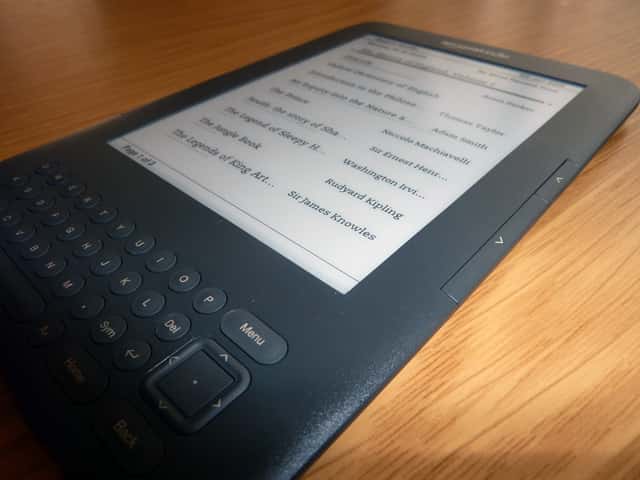
Not long after I started travelling, in early 2011, I realised that carrying physical books was too much weight and got myself an Amazon e-reader. After a lot of deliberation I went with the 3G model, hoping I'd be able to get online for free through its browser and international mobile data connection.
It turned into one of the best decisions I made for life on the road. Here's how the trick works, and how I've used it.
The trick: a US account unlocks free global browsing
My Kindle was bought from the US Amazon store, but my account listed me as Spanish, so when it arrived I couldn't browse freely — only Wikipedia and a couple of other pages worked.
After reading online that US accounts got unrestricted internet access, I decided to change my account location and list myself as a US resident. That one change flipped the experimental browser from "Wikipedia only" to "the whole web."
The clever part is the connection itself. A 3G Kindle ships with free, built-in mobile data baked into the price — Amazon calls it Whispernet, and it piggybacks on local mobile networks in dozens of countries with no SIM card, no contract and no roaming bill. It's meant for downloading books, but with a US account the basic web browser comes along for the ride.
What I actually use it for
Since then I've been able to use the Kindle 3G's basic browser to:
- check my Gmail
- look up Couchsurfing hosts as soon as I arrive in a new city after hitchhiking
- read my RSS feeds
- post on Twitter
- even browse Facebook — though that last one is too heavy for the Kindle browser and freezes constantly
My Kindle 3G has bailed me out more times than I can count, especially when I was hitchhiking across Europe with no idea how to get out of a city on public transport, or where the best hitching spot was. I'd flip open the Kindle, launch the browser, and check Hitchwiki for exactly that information. When you're stranded on the edge of a strange city with a thumb out, being able to pull a working map and a list of hitching spots out of your bag is worth its weight in gold — it's one of those free accommodation, power and internet tricks that quietly keeps a budget trip moving.
Other times it served as entertainment: reading the news for free on a train in the Czech Republic, hunting for nearby hostels in Malaysia, sending emails from Vietnam or Morocco, or looking up the next city while sitting in Thailand.
Where it works (and where it doesn't)
The free connection has worked for me almost everywhere I've tried it — across Europe, Southeast Asia, and North Africa. The one country where it stubbornly refused to connect was Laos, where the mobile infrastructure simply wasn't there to support it. Everywhere else, it found a signal.
As a rule of thumb, if a country has decent mobile coverage, the 3G Kindle will usually latch onto it. Out in the genuine middle of nowhere — or in the few countries Whispernet doesn't reach — you're back to hunting for Wi-Fi like everyone else.
The honest verdict
None of this makes the Kindle 3G perfect. Its web browsing is severely limited, the screen is black and white, it's slow, and it crashes regularly. You would never choose it over a smartphone for everyday browsing.
But that's not the point. As a free emergency back-up for the moments when you've got no local SIM, no Wi-Fi and no idea where you are, it's an absolute lifesaver — and it doubles as your entire library, which is the reason you're carrying it anyway.
Which Kindle to buy
The free-internet trick only works on the 3G (cellular) models — the Wi-Fi-only versions can't connect when there's no Wi-Fi around, which rather defeats the purpose for travel.
On Amazon Spain the 3G models tend to be the higher-end ones — historically the Kindle Voyage 3G and the Kindle Paperwhite 3G with free global internet — while the cheaper end is Wi-Fi only: the basic Kindle, the Kindle Paperwhite and the Kindle Voyage. Amazon shuffles its line-up every couple of years, so check which current model still includes free cellular before you buy.
Either way, even if you go for the cheaper Wi-Fi-only model, you're still getting a very useful travel accessory that'll save you real weight in your pack. For the rest of my favourite digital tools, see my online resources for travellers.
Frequently asked questions
Is the internet on a 3G Kindle really free?
Yes. Amazon includes the cellular data in the price of a 3G Kindle so you can download books anywhere without a SIM. There's no monthly fee and no roaming charge. The browser is officially "experimental," but with a US-based account it'll happily load most lightweight websites for free, in dozens of countries.
Why do you need a US Amazon account?
In my experience the web browser was crippled while my account was set to Spain — only Wikipedia and a handful of pages would load. Switching my account's country to the United States unlocked full browsing. The hardware was identical; it was the account region that decided what the browser could reach.
Can you use it for maps and messaging?
For basic, text-heavy stuff, yes — email, simple web pages, forums like Hitchwiki, and reading the news all work. Anything image-heavy or interactive (Facebook, modern map apps, anything with lots of JavaScript) struggles or freezes. Treat it as a slow, grayscale emergency browser, not a smartphone replacement.
Does this still work on the newest Kindles?
The principle — free cellular data bundled with a 3G Kindle — has held for years, but Amazon changes its model line-up and its browser regularly, and not every new Kindle offers free cellular. If free global internet is the feature you're buying it for, confirm the specific current model still includes it before handing over your money.
What you ask me most
- Does the Kindle 3G give free internet worldwide?
On the 3G models, yes: Amazon has deals with mobile operators around the world and covers the cost of the 3G access, so the end user pays nothing to browse. That said, on the newer models access is usually limited to Amazon and Wikipedia; the open internet was mainly on the keyboard Kindles.
- Can I use the Kindle to view photos or listen to music?
Yes. If you create a folder called «pictures» you can view the photos you load onto it, and by saving music in a «music» folder you can use it as an MP3 player.